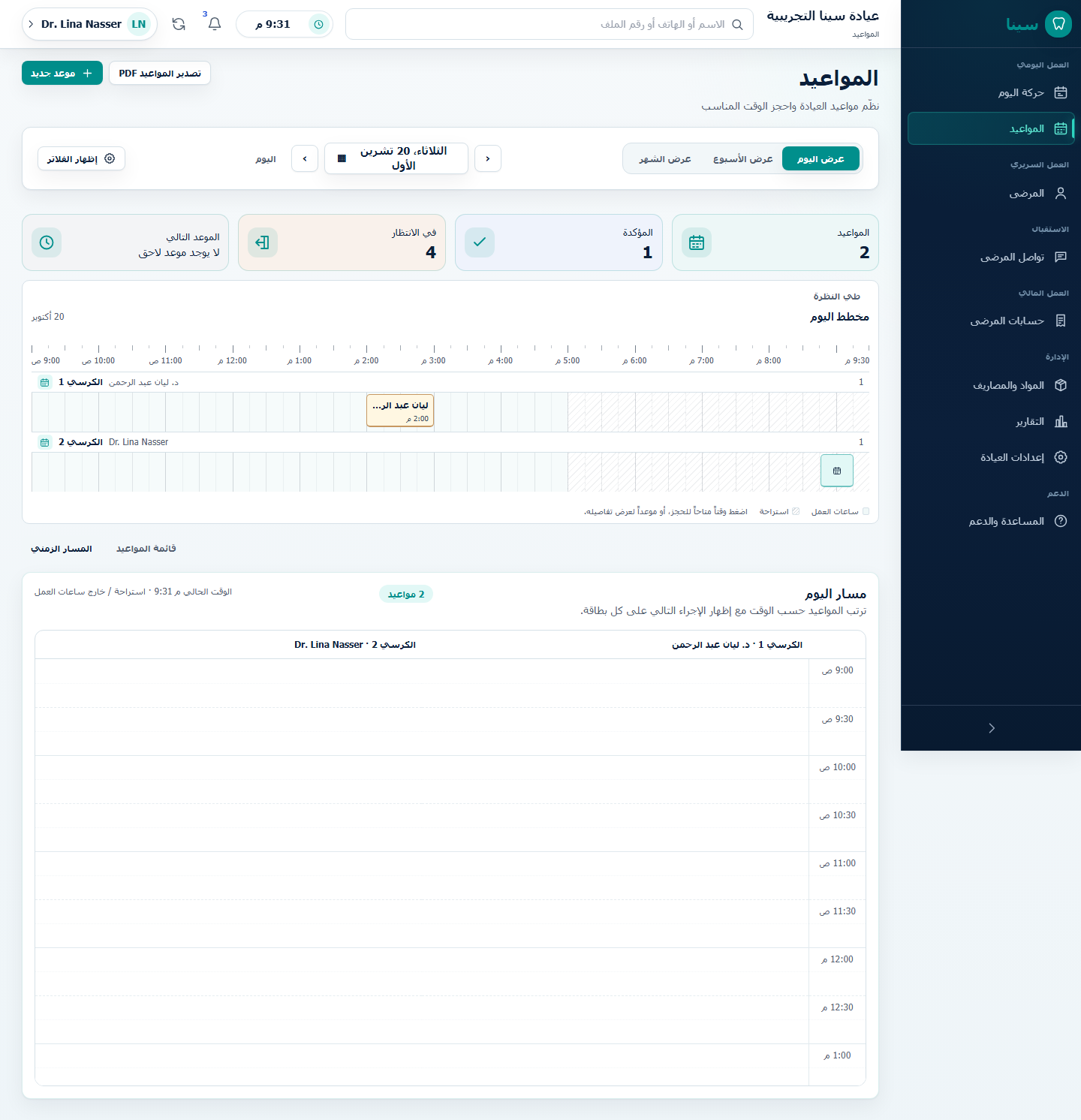
Appointments

Arabic guidance is available through the language switcher. Appointments reserve expected clinic time; they do not replace the queue, clinical Visit, Billing, Follow-up, or Communications records.

Calendar Views

The Schedule opens on the clinic-local date and offers Day, Week, and Month views. The selected date and view stay in the page address, so browser Back and shared links restore the same calendar context.

The primary-navigation Today destination always opens the current clinic day. It never inherits a historical Schedule date; Back restores the exact dated URL.

Status, clinician, and appointment-type filters start collapsed on every screen so the schedule stays close to the date controls. Show filters expands them; active criteria remain visible as compact labels, and Reset filters clears only those criteria. The selected date and calendar view stay unchanged. The clock-icon control in the global header shows device time in 12-hour format with seconds. SINA uses Latin digits (0-9) in every language; appointment times still follow the clinic timezone.

  • Day shows working-hour slots and all appointments for that date. An appointment remains visible even if working hours are changed later or the saved time falls outside the current hours. Previous day, date, and next day stay together as one compact navigation group. The interactive day map shows gaps, appointments, their full saved duration, and the current-time position. A booked segment opens its appointment. A small + starts a draft only for a real free 15-minute gap when filters are clear and creation is allowed; it never appears for a filtered or overlapping interval.
  • Week shows seven days with visible hour and half-hour guides. Each compact appointment spans its complete saved duration and shows the patient, time range, status, and type; smaller screens scroll horizontally instead of clipping.
  • Month shows six calendar rows. The add action is available only on an open clinic day and starts at that day's first configured working period.

Users without appointments:create can review permitted schedule data but do not receive empty-slot or calendar add buttons. Existing appointments remain available according to their read and action permissions.

Day Schedule

The default solo-clinic view is a chronological day timeline based on the organization timezone and configured working hours. Open slots create a local appointment draft with the selected date and time. Nothing is persisted until Create appointment succeeds. Empty half-hour rows stay compact so a quiet day can be scanned without excessive scrolling; cards represent their full start-to-end interval. A partial-row + identifies only a verified free 15-minute interval and stays hidden under filters or conflicts. Times follow the interface language.

Each card leads with:

  1. patient name;
  2. local start time and duration;
  3. reason or appointment type;
  4. current operational state;
  5. tooth context when known;
  6. one state-specific next action.

The sole clinician and chair are not repeated on every card. When the backend proves exactly one active dentist and one active dental chair, those real IDs are resolved and persisted automatically. A clinic with several clinicians or chairs keeps the relevant selector, filter, and grouped layout. SINA never chooses the first of several resources and never uses an inactive chair.

Create An Appointment

The ordinary editor contains patient, reason/type, start time, a 15, 30, 45, or 60-minute duration, and a derived end time. Its 12-hour control keeps AM/PM visually last—on the left of the time in RTL Arabic. Clinician and chair appear only when a real choice exists. Patient-facing and internal scheduling notes stay collapsed. Diagnosis, examination, procedures, medication, anesthesia, treatment planning, and clinical follow-up narrative belong to the permission-checked Patient Record or linked clinical Visit, not this scheduling form.

The ordinary editor has no separate free-text appointment Title and asks for no clinic or patient address. The selected controlled appointment type is the visible reason and supplies a stable compatibility value when the legacy RPC title is required; stored historical titles remain unchanged. Clinic location comes from organization configuration and is shown only when several real locations require a choice.

Patient search supports the current Arabic/English name and phone boundary. Patient Record and follow-up handoffs preselect the known patient as an unsaved draft. When the patient is not found, the same editor can open the minimal search-first registration flow. A successful patient save returns to the unchanged Appointment draft and selects the new real patient; the Appointment still requires its own explicit save. Closing a meaningful draft asks before discarding it.

Conflicts And Working Hours

The server validates clinic working hours, patient overlap, clinician overlap, chair overlap, active resources, duration, tenant relationships, and stale state. The organization timezone is used for wall-clock input and display. The initial Today date also comes from that timezone, not the device timezone, so the Schedule and Today workspace cannot disagree near midnight. Conflict checks run again under short transaction locks, preventing concurrent requests from claiming the same active slot. An authorized overlap override, where already supported, never bypasses working hours.

A safe conflict message asks the user to choose another time without exposing another patient's identity or internal database details.

Reschedule, Cancel, And No-Show

  • Reschedule changes the same appointment. It preserves identity, patient, previous/new time, reason, actor, audit evidence, and concurrent-write checks.
  • Cancel is a persisted terminal transition, never a hard delete. A bounded nonblank reason is required.
  • No-show is distinct from cancellation and requires an explicit bounded reason. SINA does not classify late patients automatically.
  • Cancelled and no-show appointments cannot start a Visit. Their operational queue projection is synchronized when one exists.

Arrival To Departure

  1. An eligible live appointment appears in Not arrived yet until Record arrival succeeds. Opening the appointment does not mark arrival, and the arrival does not change its scheduled time.
  2. Before arrival, a late label is derived from clinic-local current time and scheduled start. It is not an appointment status, no-show, or priority. After arrival, the patient moves to In clinic now and actual wait duration is shown instead.
  3. A newly created arrival may offer Undo for 10 seconds. The server accepts the exact version only while its operational entry is still untouched in the arrived state and has no Visit; the appointment itself is preserved.
  4. Start Visit can be chosen for any eligible waiting patient. It atomically validates appointment and queue state, starts or reuses one exact Visit, and opens the patient's clinical context. A different active Visit is never replaced silently.
  5. Continue Visit opens the current active context without a state change. Resume Visit is a separate version-checked transition for a paused Visit. Retrying Start does not create a duplicate active Visit.
  6. Completing the Visit synchronizes the clinical, queue, and appointment projections. It creates no invoice, payment, follow-up appointment, message, or departure automatically.
  7. Mark departed is a separate versioned operational transition. A completed Visit remains available for authorized read-only review.

Walk-ins continue through the explicit operational workflow. They are not represented by fake placeholder appointments.

Today disables arrival, start, and resume while offline. If appointments or the queue fail independently, it keeps healthy sections readable and marks the unknown section unavailable; it never treats missing queue data as proof that a patient has not arrived.

See Daily Clinic Workflow and Active Dental Visit.